


A practical walkthrough of running a self-hosted, read-only AI agent inside a Kubernetes cluster, with the full CI/CD chain handled by GitHub Actions and Argo CD Image Updater. No data leaves the cluster, no cloud AI provider involved.
Why a Cluster-Aware Agent Is an Interesting Pattern
Most “AI for Kubernetes” tooling today is a hosted SaaS that consumes cluster data and returns advice. The model lives elsewhere. The data leaves the network.
This article walks through the opposite design: an agent that runs inside the cluster, observes live state through the Kubernetes API, and reasons with a local LLM. Every layer is visible, every credential is scoped, and the only network egress is a model pull at startup.
The interesting properties of this pattern for platform engineers:
| Property | What it provides |
| Cluster-aware | The agent reads live pods, events, and logs and reasons about real state rather than generic Kubernetes facts. |
| Read-only by design | A dedicated ServiceAccount + ClusterRole with get/list verbs only. The agent can observe but cannot mutate the cluster, regardless of what the model produces. |
| Just another K8s workload | The agent is a Deployment + Service + PersistentVolumeClaim. No special runtime, no operator, no custom scheduler. |
| Full GitOps | Prompts, model selection, and RBAC live in Git. Argo CD reconciles them. The agent’s behavior is auditable through git log. |
Source code: github.com/MaryamTavakkoli/local-k8s-ai-agent
LLM vs. AI Agent: The Distinction That Matters
A Large Language Model answers from training data alone. It has no awareness of the environment it’s deployed into. An agent, in the sense used here, performs an extra step before reasoning: it observes the real world and incorporates that observation into the prompt.
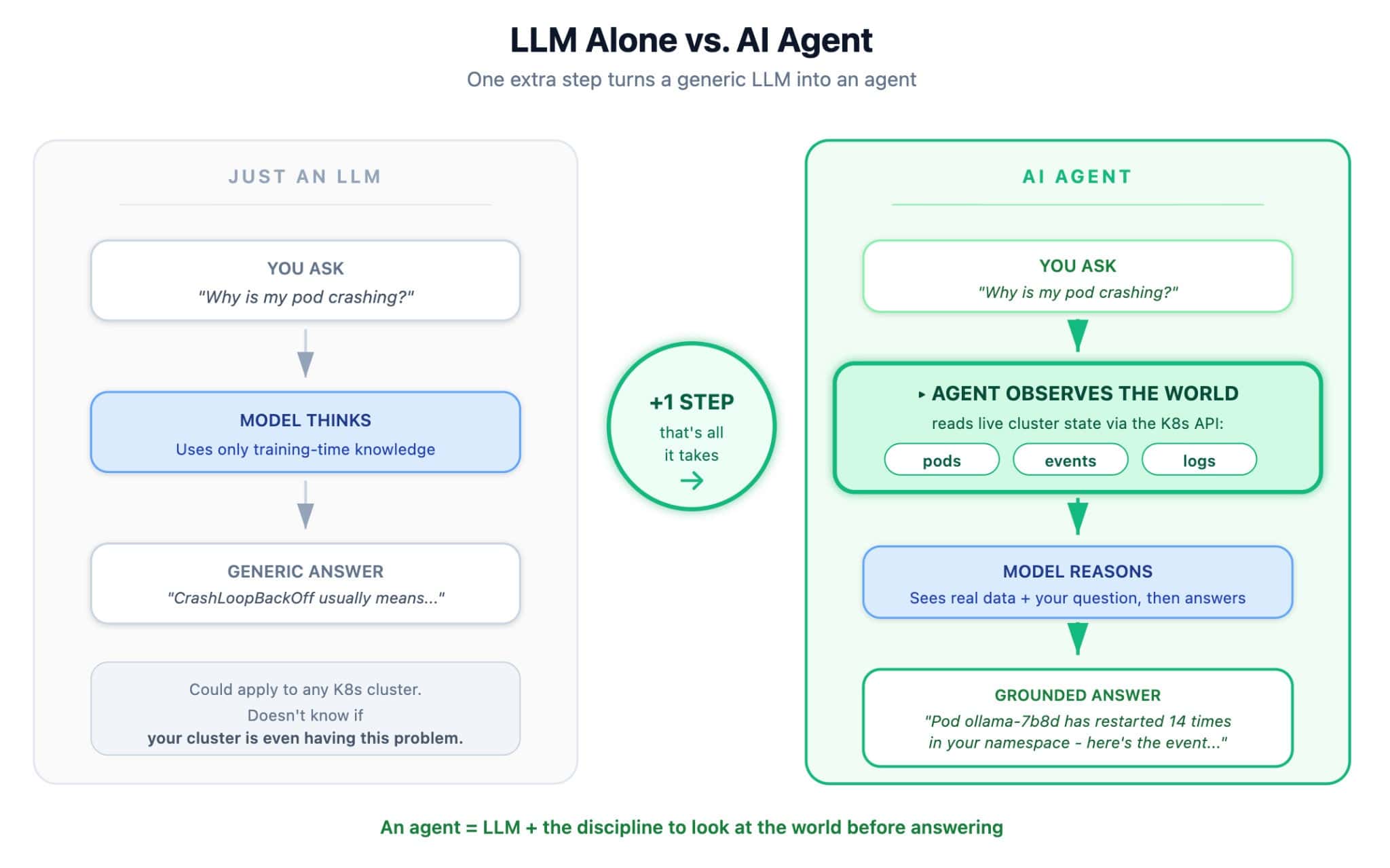
The contrast in output is concrete. A generic LLM call returns “CrashLoopBackOff usually means the container is failing health checks or exiting unexpectedly…” An agent call returns “Pod api-7b8d has restarted 14 times in the last hour with ImagePullBackOff against registry.local. Run kubectl describe pod api-7b8d to confirm.”
The second answer is grounded. The first answer is correct but not actionable for this cluster.
This project demonstrates both modes through two REST endpoints:
POST /ask— LLM alone, useful for general questions like “What is a StatefulSet?”POST /diagnose— the agent: reads live cluster state, then reasons over it
Architecture
The system has two halves: a CI/CD chain on the top and a Kubernetes runtime on the bottom.
Runtime side:
- An Ollama pod serves a local Mistral 7B model on port 11434
- A FastAPI pod exposes the agent’s HTTP API and chat UI on port 8000
- A
PersistentVolumeClaimholds the model weights so pulls aren’t repeated - A dedicated
ServiceAccountmounted in the FastAPI pod has aClusterRolepermitting only read operations on pods, events, logs, services, and deployments
Delivery side:
- A push to the application source in Git triggers GitHub Actions to build a multi-architecture image (
linux/amd64 + linux/arm64) tagged with the 7-character commit SHA - Argo CD Image Updater (from argoproj-labs) polls Docker Hub on a 2-minute interval, detects new tags matching the configured regex, and commits the new tag back into the repository’s
kustomization.yaml - Argo CD detects the manifest change and reconciles the cluster
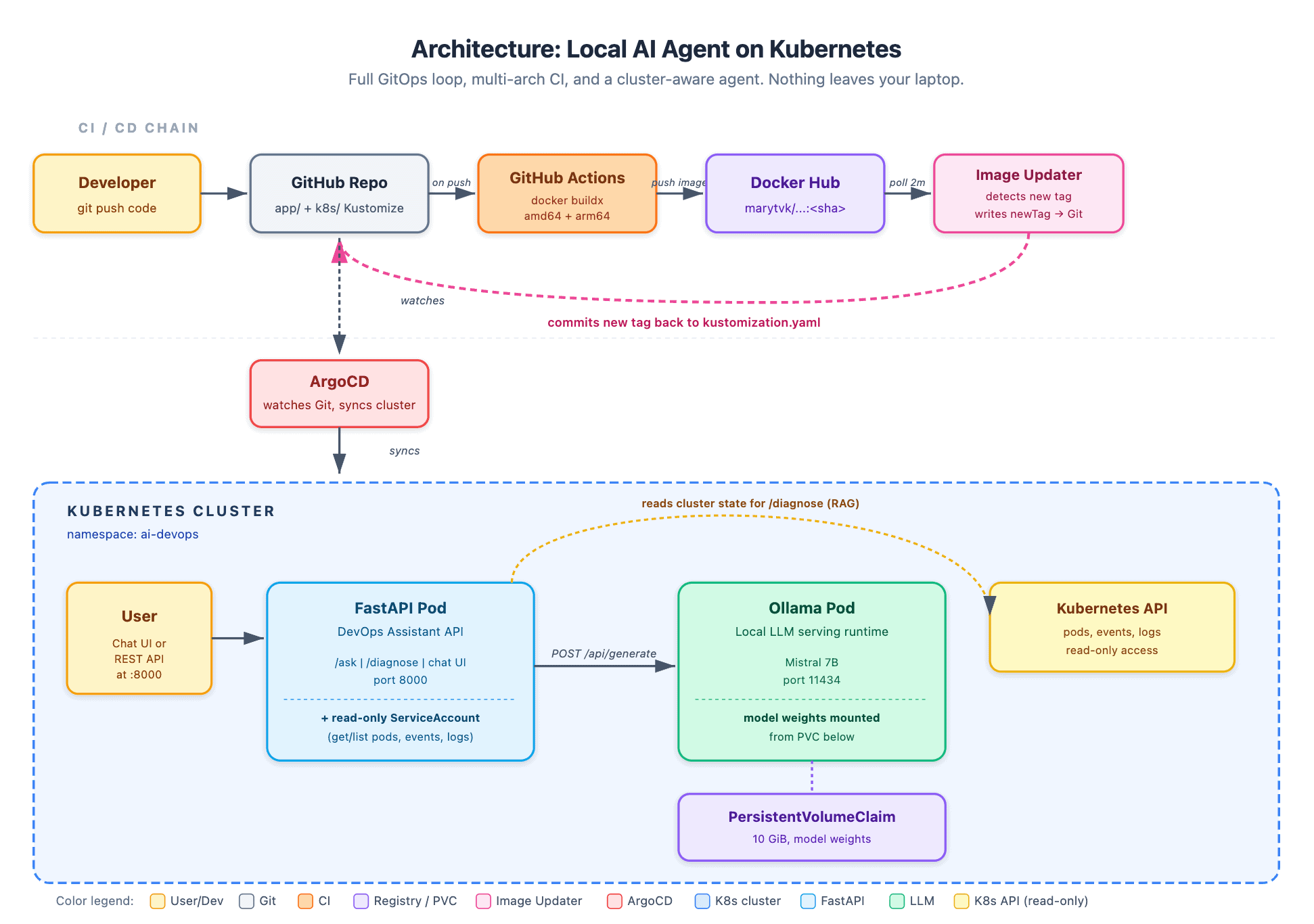
The two halves are decoupled. Argo CD has no awareness of the registry. GitHub Actions has no awareness of the cluster. Image Updater is the small operator that bridges them, and it does so by writing to Git, which preserves a single source of truth.
The AI Concepts You’ll Actually Touch
Here are a few concepts that every AI engineer uses every day, explained in plain language.
1. LLM (Large Language Model)
A statistical model trained on enormous amounts of text. It doesn’t “know” facts; it predicts the most likely next word given everything that came before. That’s it. The magic is that this simple task, done at scale, produces something that feels like reasoning.
This project uses Mistral 7B, a 7-billion-parameter open-source model. “Parameters” are the numbers the model learned during training, similar to the strengths of connections in a brain.
2. Local LLM
Most commercial AI services send your text to a remote cloud provider. The trade-off is capability: a local 7B model isn’t as expansive as a massive foundational model running on cloud infrastructure.. But for experimenting, it’s more than enough. And nothing leaves your network.
3. Ollama (The Model Serving Runtime)
Ollama is not an AI model. It’s a server that runs AI models. Think of it like a web server for LLMs: it downloads the model files, loads them into memory, and exposes a REST API on port 11434 so anything (including our FastAPI app) can send prompts and get responses.
Without Ollama, you’d be wrestling with PyTorch, CUDA, and tokenizer libraries. With it, running an LLM is ollama pull mistral followed by an HTTP POST.
4. System Prompt (The Personality)
This is the single most important AI concept for application developers, and you can master it in about ten minutes.
A system prompt is the instructions you give the model before the user’s question. The model reads it first and uses it to shape every response.
In our project, the system prompt for /ask is:
“You are a DevOps assistant specializing in Kubernetes.
When given an error or question, you:
1. Explain what it means clearly
2. Provide the exact kubectl commands to diagnose or fix it
3. Explain why the fix works
Be concise and practical.”
Without that prompt, Mistral is a general assistant. With it, Mistral is a Kubernetes specialist who always returns structured answers. No retraining was needed. This is called prompt engineering, and it’s how almost every AI product you use was built.
5. RAG (Retrieval-Augmented Generation)
The fancy term for what /diagnose does. RAG means: before asking the model, retrieve real-world data and augment the prompt with it.
RAG is why contemporary AI assistants work. A code assistant reads your local workspace repository; our agent reads your live cluster state.. Same pattern, different data source.
The Two Modes: Where the Agent Becomes Real
Here’s where the “agent” idea earns its name.
Mode 1: Ask (LLM alone)
You type a question, FastAPI prepends the system prompt, sends it to Ollama. The model answers from its training data. Useful for general K8s questions like “What is a StatefulSet?”
Mode 2: Diagnose Cluster (true agent)
You type a question and a namespace. FastAPI does something new: it calls the Kubernetes API and reads:
All pods in that namespace (phase, restart count, waiting reason)
The last 10 events
The last 20 lines of logs from any non-Running pod
That entire context is injected into the prompt. Then Mistral reasons, but now it’s reasoning about your actual cluster, not generic Kubernetes knowledge.
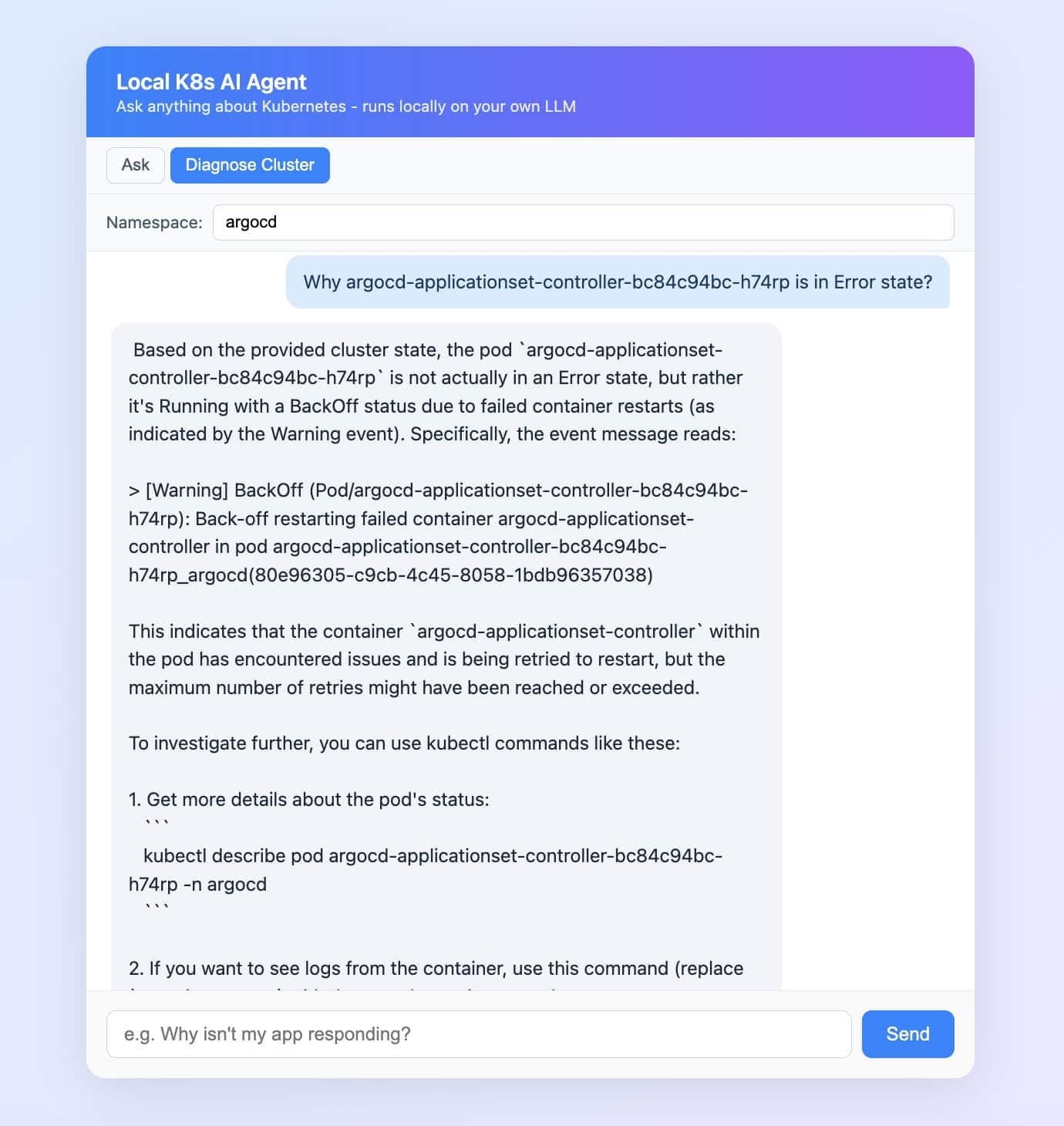
The chat UI even shows you the exact context the agent read, in a collapsible panel under each answer.
Read-Only by Design
The agent runs with a ServiceAccount bound to a ClusterRole that exposes only read verbs:
apiVersion: rbac.authorization.k8s.io/v1
kind: ClusterRole
metadata:
  name: ai-devops-api-reader
rules:
  - apiGroups: [""]
    resources: ["pods", "pods/log", "events", "services", "configmaps", "namespaces"]
    verbs: ["get", "list"]
  - apiGroups: ["apps"]
    resources: ["deployments", "replicasets", "statefulsets", "daemonsets"]
    verbs: ["get", "list"]
This is the most important design decision in the project, and it generalizes beyond AI workloads. An agent that can delete pod based on its own reasoning is a production incident waiting to happen. Hallucinations multiplied by write access is a poor combination.
Read-only RBAC inverts the trust model. The agent is allowed to be wrong because being wrong has no consequences. The Kubernetes API server enforces the boundary; the LLM’s output cannot bypass it. Iteration on prompts and models becomes cheap because the worst-case behavior is bounded.
The same pattern scales: start every agent read-only, then earn each additional capability one verb at a time, each with its own RBAC rule and review.
The CI/CD Chain in Detail
The delivery half of the architecture uses three independent components, each with one responsibility.
GitHub Actions builds and pushes the image. The workflow uses docker buildx with QEMU emulation to produce a manifest list covering both linux/amd64 (GitHub-hosted runners) and linux/arm64 (Apple Silicon developer machines). The tag is the 7-character commit SHA, an immutable reference.
Argo CD Image Updater polls the registry on a 2-minute interval. Configuration lives in an ImageUpdater Custom Resource that names the target Argo CD Application, the image to track, an allowTags regex (^[0-9a-f]{7}$), and the update strategy (newest-build). When a new matching tag is found, the operator rewrites the newTag field in k8s/kustomization.yaml and commits the change to the main branch.
apiVersion: argocd-image-updater.argoproj.io/v1alpha1
kind: ImageUpdater
metadata:
  name: local-k8s-ai-agent
  namespace: argocd
spec:
  writeBackConfig:
    method: git
    gitConfig:
      branch: main
      writeBackTarget: "kustomization:."
  applicationRefs:
    - namePattern: "local-k8s-ai-agent"
      images:
        - alias: api
          imageName: marytvk/local-k8s-ai-agent
          commonUpdateSettings:
            updateStrategy: newest-build
            allowTags: "regexp:^[0-9a-f]{7}$"
Argo CD watches the repository and reconciles the cluster on each commit. Because the source manifests are managed by Kustomize, Argo CD applies the rendered output, which now includes the updated image tag.
Try It Yourself: It’s a Starting Point, Not a Destination
The repo is here: github.com/MaryamTavakkoli/local-k8s-ai-agent
Step-by-step setup with exact commands is in the README. Total time from git clone to working chat UI is about 30 minutes (most of that is the Mistral download).
To bring this article full circle: if you’re a DevOps or Platform Engineer who’s been hearing “AI agents are coming” and wondering what that actually means in practice, this is meant to be your starting point, not your finish line. Once you’ve seen the agent loop running, you’ll be in a much better position to continue.
The point of starting local isn’t that local is always the right answer. It’s to understand how the full circle works behind the scenes.